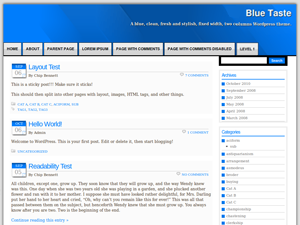
Blue Taste WP Theme
Blue Taste is my first published WordPress theme.
It’s a blue theme with a fixed-size and two-column design (the main content and a right side-bar). It’s widget-ready and has a drop down integrated navigation menu.
The design is clean and elegant and is suitable for a blog or a non-blog website
Feel free to download, test it and leave comments.
ABOUT HOSTING: Many people asked me about a good hosting to run a Wordpress blog. I have an article here in my blog about this topic, but it is in spanish, so I just wanted to add to this post a few lines about the hosting that I am using and I recommend. This blog is being hosted by Hostgator, I tried many hosting services before and up to now I have to say that its the best one I used. The plan that Im uusing is called “Baby Plan” and lets you add as many sites as you want, and installing a Wordpress blog is as easy as making a few clicks in the control panel. So, thats what I recommend right now and I will leave this lines in this post until I get disappointed by the service, hope that will never happen. This is the link for HostGator, and clicking there you are linked to their site as my referral, so, thanks.

Noviembre 2nd, 2010 a las 5:10
hey, I have installed the theme, and feels good, but I would like to get the version being used for your site, would you mind send a copy to me? EMAIL: wang#ofyu.com thanks!
Noviembre 3rd, 2010 a las 12:26
Hey Wang. Thanks for the comments about my theme. The theme that I am using for this blog isn’t mine, you can go to the authors page (and download it form there) by clicking the link in the credits part of the page footer.
Noviembre 12th, 2010 a las 23:35
Seems good!~
Diciembre 2nd, 2010 a las 15:16
Hey, i installed your theme and i think it’s fine – but I have a question: is it possible to make it works, that not each first letter in an articel title is a capital letter?
Thanks!
Diciembre 2nd, 2010 a las 15:21
I did it myself!
Diciembre 6th, 2010 a las 0:06
Hello.
I like your WP theme and I am trying to use it.
Is there anyway to increase the font size for the “sub-page” menu? (the drop-down menu under the page menu).
Thank you in advance for your help. And thank you for your WP theme.
Diciembre 6th, 2010 a las 23:12
@Jannis: good to hear that you figured out how to resolve it! Just in case someone else needs this I will leave the answer in this comment. So, in order to remove de capital letter of all words in a title it will be necesary to edit the style.css file (line 133) and remove the “text-transform: capitalize;” option from the .post-title style.
@Steven: hi there! yes, it’s possible to do that. You need to edit the style.css file on line 81 and change the font-size option from 10px to a higher number, 12px would be a good choice.
Thanks for downloading and installing the theme.
Diciembre 7th, 2010 a las 11:17
i have installed the theme , looks good.2 issues i am facing :-
1. Where can I centre my header text ? It’s currently right-aligbed.
2. Can I change the side bar width ?
3. Can I change my landing page ?
Diciembre 12th, 2010 a las 14:39
Soumitra:
1. You need to change the “logo” style (line 171 if style.css file). Change the text-align property from “right” to “center”
2. It’s not prepared to change that width in a straight way, in order to do that you need to change many fixed widths in the style.css file, if you know something about css styiling you won’t have any problem.
3. You can change the front page of your site from the wordpress panel, It’s under the “Settings > Reading” option.
Diciembre 16th, 2010 a las 9:06
Hello Javo, I think your template is great ! It is easy to read and looks very professional. I am new to building websites but I will be using your template alot ! I have some questions about changing the template and hope you can help ?
1) I would like to add a phone number & email address to the header under the TITLE & DESCRIPTION ?
2) How do I alter the width of the Page Tabs to fit the Page Heading ? They are all fixed width.
You can see what I have done so far by visiting the website, Thank You for the template and your help. Craig
Diciembre 17th, 2010 a las 1:21
Hello Javo, Blue-taste is great, but there is something I want to ask you:
1. How can I delete the blue border and change gray background to white background?
2. How can I change header to my own image header?
Thank you for the template and your help.
Diciembre 19th, 2010 a las 4:44
I’ve been use your WP theme and I like it.
Is there anyway to change header with my picture ?
Thank for advance, and thank for your WP theme.
Diciembre 26th, 2010 a las 14:07
Hi there!, couldn’t answer earlier,
@Craig: thanks for your comments about my template, hope to be useful to you. About your questions: 1) To add that information you can edit the header.php fill (below line 44) and enter the information there. 2) That width is only fixed in IE, if you use Firefox or Chrome it will adapt automatically to the content. I liked your site! keep going and good luck with future sites!.
@Florentina: 1) What blue border do you want to change? the one that is for the pictures? You can change the background color to whit, by changing from “dedede” on line 11 of styles.css to “ffffff”, but shadows are not designed to that background color so i don’t think that is a good idea. 2) To change your header image you have to replace “header-bg.gif” under images folder with the image that you want.
@Banxts: read what i have just answered to Florentina and follow that steps to change the header image.
Happy holidays!
Diciembre 29th, 2010 a las 14:35
Excellent theme.
Febrero 1st, 2011 a las 12:52
This is best and plane themplate
Febrero 5th, 2011 a las 19:21
May we remove the link in the footer to your site?
Febrero 8th, 2011 a las 17:27
@Michael Clark: It’s allowed to do that. But I think that should be done in specific cases because leaving the credits is the way of giving back and recognize the developer work. In this theme I tried to make the credits part as non-intrusive as possible, the are below the footer and in light gray.
So, it’s up to you to remove it or not.
By the way: thanks for asking!
@Herath: Thanks!
Febrero 9th, 2011 a las 22:34
this is a very nice and simple theme that i use on my site.
I have some questions:
1. can I remove the blue bar that appears on the left side of the heading 1?
2. can i remove the post date on some if not all of the posts? the graphics is very nice but on some posts i would like to remove the date
thanks
Febrero 10th, 2011 a las 20:12
Hi again,
My client ended up preferring a different theme. If he had wanted your theme, and the link removed, I would have sent you a donation in exchange for my removing the link. Thanks again, have a great day, Mike
Febrero 28th, 2011 a las 17:58
Hi, thanks for this template. I have one questions. In the page meniu (like home, about, etc), when I am on a page could it be hilighted somehow, so that you can figure out on what page you are?
Thanks and well done.
Marzo 3rd, 2011 a las 15:14
Hello, I like the theme very much, thanx!
I replace the blue header with another image, can you tell me where I can move the page buttons more down?
I am reading the style sheet over and over again, but can’t find it.
In other words I want to increase the header hight (fixed that) but then the page buttons don’t move down.
Marzo 10th, 2011 a las 10:15
hello. It’s a very nice theme. I really liked it but why is the sidebar in the widgets only have 1. thanx.
Marzo 27th, 2011 a las 19:02
Hello, I have been very busy lately, but here I am again.
@raffy:
1. Yes! you can do it, just edit the line 30 of style.css file, change the value of border-left to zero.
2. To remove the date you can edit the template file and erase that part… if you need to do it for only some posts you will have to write some specific code.
@Michael Clark:
Hi again Mike!, thanks for the gesture. I never thougth about asking money while creating the theme, that wasn’t the idea. Thanks for your visit and comments.
@Radu Andrei:
Well, that’s a good feature that is not included in the theme. I think that It would be easy to do it since Wordpress adds a special style to the element of the menu that was selected, so the only thing that have to be done is find out what’s the name of that class and add it to the style.css file.
@Rene:
Hi!, you can try increasing the height property of the header style (line 73 of style.css) and also the height of the logo style (line 98), then the menu should go down.
@tantoz:
Hi! can’t understand your question, the theme only has one sidebar. Thanks for the comment.
Marzo 28th, 2011 a las 8:26
Hi Javo,
Following on from a former commenter, regarding the fixed width page buttons in Ie, is there any way to stop this behaviour in IE, as my page titles are a bit to large.
Great theme by the way.
Marzo 30th, 2011 a las 10:00
Hi – I have installed the theme but get the following error message:
Call to undefined function home_url() in /home/gradecom/public_html/wp-content/themes/blue-taste/header.php on line 43
can you help?
Marzo 31st, 2011 a las 16:22
Hi
I have solved the previous issue with a Wordpress upgrade. But I have a problem in that I cannot see how to remove the HOME page tab or otherwise edit its content – can you help please?
Marzo 31st, 2011 a las 18:47
Hi Alex,
- that function “home_url()” was implemented in a recent Wordpress version (last year) so the solution was, as you did: upgrade Wordpress.
- if you want to remove the “Home” option from the menu: delete the line 49 from the header.php file.
Abril 1st, 2011 a las 5:46
thats done the trick! – many tanks for such a speedy reply – cheers Alex
Abril 3rd, 2011 a las 18:28
simple theme,i like this thank’s
Abril 30th, 2011 a las 1:01
Hi Javo
Thanks for an excellent & very simple theme. Every time I am looking at it , I have found no simpler & cuter theme than this.
Just help me in one of the issues :-
1. How can I reduce the height of the header ? I am not an HTML/CSS specialist.
2. From one of the older posts , I can see that I can change & put my own header image. What should be the size of the image ?
Many thanks , Soumitra from India
Mayo 4th, 2011 a las 5:25
Hey fella,
UK calling….Thanks for the theme, I really like it but some reason I can’t seem to be able to change the font colour in the ddnav style. I’ve tried adding font colour etc…I’m pretty new to all this so apologies for what will be a very simple answer I’m sure !!!
Cheers
Adam, UK
Mayo 9th, 2011 a las 23:50
@Soumitra
1. To change the header height you will need to edit the style.css file and change the height property in lines 73 and 98. You have to reduce the same amount of pixels in each line.
2. The current size of the header background image is 938×164px, but you will need to change it to the new reduced height that you wanted.
@Adam Berry
To change the font color of the menu you have to edit the line 76 of style.css file and change the color attribute. The color of the rollover effect is on the next line.
Junio 4th, 2011 a las 12:13
Hi again,
Thanks for your help last time. I’ve added a custom menu for the top menu, but it includes the non-customer menu aswell. I went into page.php and removed the function and this seemed to resolve it. However the customer menu appears well below the bottom of the header now instead of sat at the bottom of it…Any ideas how I can resolve this ??
Thanks again
Adam
Junio 4th, 2011 a las 12:32
Sorry mate I changed header.php there is no page.php !!
Junio 8th, 2011 a las 14:45
@Dice : I tried with changing header height, but your default looks better, hence no change.
2. I want to change the order by which my page names appear. That is If you see from left :
Home,What will…,Useful Links,Classifieds etc.
If I want to change the order like :-
Home , Classifieds , what will… etc , then what to do ?
Junio 20th, 2011 a las 22:51
Awesome theme man!!!!! I love it.
Junio 24th, 2011 a las 4:58
Great theme,i love it very much but i have 1 question;
@Dice:How do i change the menu order,i cant find where to change the order;e.g Home,About us……The menus are just jumbled,i dont know if its using date modified to arrange the menu
Thanks in advance
Julio 2nd, 2011 a las 5:09
Weldon! it is CUTE theme
if i can use it on Blogspot
thanks
Julio 25th, 2011 a las 16:09
Free And Cheap Linux Hosting India Provider
Agosto 2nd, 2011 a las 23:03
Hi,
I’m new to Wordpress. I’m creating a blog with Blue-taste. So far it’s great, except that for some reason, links in posts seem to be ignored. I use the “InsertEdit Link” form. Create the link. And then, the link HTML code is removed. Any idea why?
Many thanks for creating Blue-taste.
Luc
Agosto 21st, 2011 a las 3:21
Hello. Working on my second website. My first is an iweb site looking to take my sites to the next level. NEW to word press. Like the appearance of your theme. Questions:
1. How do I add a logo to the top left (header)
2. How do i make it so the dates of my posts don’t show? I am building a static website for commerce. Not really a blog.
Thanks!
Septiembre 25th, 2011 a las 15:42
Hi , today installed your theme on 1 more site.
Great , Clean theme.
Congrats
Noviembre 3rd, 2011 a las 21:28
Hi. I am using the Blue Taste theme for a site that I am building, and it is very nice. I do have question about the placement of images:
How can I get some space between the frame that is placed around the image, and the text from the page? The outer edge of the image appears right against the text no matter what I do.
Thank you.
Noviembre 14th, 2011 a las 8:20
Hi. This is the site I am working on now. I want to disable comments on pages. How to do that ?
Noviembre 15th, 2011 a las 3:48
I want to interchange the page names they appear :-
1. I want to Contact us in place of About Us.
2. Also want to increase the Font size for that.
And great , from an other post I could remove the “Home” icon.
Noviembre 15th, 2011 a las 3:50
@ Joe : You can click on the image itself , go to advance options , select left alignment & adjust the space in advance options.
Should work
Noviembre 18th, 2011 a las 14:11
Hi. Can I change the color of the page title , when I am on the page?
Noviembre 30th, 2011 a las 0:24
mate, i luv your skin, so easy to learn with. you talked above about background shadow, can the shadow colour be changed?
Diciembre 22nd, 2011 a las 1:05
Greetings, trying to find how to add another horizontal menu underneath the existing menu bar. Would also like to know how to rearrange the menu buttons….love this theme, but I cannot find the file to edit.
Thank you for your hard work.
Enero 30th, 2012 a las 0:29
I like the theme, but I can’t figure out how to remove the borders from the images. My logo in an image widget in the upper right hand column and every image in the blog posts have a border, and I can’t figure out how to remove them. Your help is much appreciated.
Marzo 13th, 2012 a las 5:54
I like your theme. I’va installed your theme.
Thanks
Abril 2nd, 2012 a las 18:08
Hello!
Great work, I really like your theme and appreciate your work. At the moment I’m trying to adjust it in order to move my whole site to Blue Taste.
Just one thing: How can I change the background colour of the header page button (where the first is “Home” and the others are my pages)?
Thanks in advance
Thomas
Abril 2nd, 2012 a las 18:14
I found it out myself. Just change the images/bot-bg.gif file to whatever your background should look like.
Abril 11th, 2012 a las 17:28
Just saw this topic now, sorry…
I wrote as an comment to other article, here is the beef of it:
Hello Jabox
How get the comments shown up after every article in your Blue Taste template as there is not (I don’t see it) loop-single.php where I could ad (Less than)?php comments_template(); ?(Greater than), so how to do it with Blue Taste, if possible?
Abril 11th, 2012 a las 17:29
Just saw this topic now, sorry…
I wrote as an comment to other article, here is the beef of it:
Hello Jabox
How get the comments shown up after every article in your Blue Taste template as there is not (I don’t see it) loop-single.php where I could ad (Less than)?php comments_template(); ?(Greater than), so how to do it with Blue Taste, if possible?
Your spam protector (Akismet maybe?) don’t let me write this here saying
Abril 11th, 2012 a las 17:31
… was just going to look what it says and then it let me through
OK, now I see, I was doubleclick ‘Enviar comentario’-button.
Mayo 11th, 2012 a las 10:09
Hi
Is there a pot file for Portuguese?
How ca i use it with these theme.
Thanks
Mayo 14th, 2012 a las 23:29
I installed your theme but when i installed a custom menu, it gives me 2 menus. Can you help me?
Agosto 11th, 2012 a las 14:36
Me Voila a acer un jabox
Agosto 11th, 2012 a las 14:38
Ola soy MARVIN y soy un cabrían
Agosto 21st, 2012 a las 1:53
Jabox:
I like your theme a lot. Is there any way to remove the sidebar from certain pages. I would like to only have the sidebar on the “Home” page. Thanks for your help.
Octubre 7th, 2012 a las 8:58
How to download it?
Marzo 12th, 2013 a las 18:38
Great read, but your website was loading super slow. Where is it hosted?
Marzo 13th, 2013 a las 9:11
It’s a shame you don’t have a donate button! I’d without a doubt donate to this fantastic blog! I suppose for now i’ll settle for bookmarking and adding your RSS feed to my Google account. I look forward to new updates and will share this blog with my Facebook group. Talk soon! tabs http://poul11.livejournal.com/10691.html/
Mayo 29th, 2013 a las 18:30
There’s a duplication of home tab in my site. One in the beginning of the menu and one in the end.
I have tried many solutions from admin panel (to create a new menu or to delete the home page) but there’s no success.
Thanks for your help.
Ciao